

If your challenge is built on movement, such as walking, running or biking, the mobile app is the better home for it. A phone is already in the pocket during the activity, and a native app can use the phone’s sensors, run in the background and send reminders. A web experience is easier to reach and cheaper to build, so it works well for sign-ups, dashboards and reporting. That split is how we run Charity Miles: a free iOS and Android app tracks the miles, and companies, charities and members use the platform around it to set up teams and follow results.
This guide is for people who run or join activity challenges: individuals who want their workouts to fund a cause, charities looking for grassroots supporters, and HR, CSR and wellness leaders choosing a format for employees. It covers where mobile and web differ, what goes wrong with each, and how to choose.
TL;DR
- Mobile apps can track distance through device sensors, work in the background and use notifications. Web apps run in a browser with nothing to install, which makes them easy to open and update.
- For a challenge where people log walks, runs and rides, mobile removes the manual entry that makes participation drop off.
- The web is strongest for the “around the activity” work: sign-up, leaderboards, admin settings and reports.
- Privacy is not simply better on one side. Research found that websites and apps leak different kinds of data, so clear permissions matter on both.
- Charity Miles is a free app for members. Companies can add private teams, set their own sponsorship terms and choose where donations go.
Table of Contents
- What actually separates a mobile app from a web app
- Where the web falls short for movement challenges
- Where mobile brings its own challenges
- Testing: what changes between the two
- Privacy and permissions
- Accessibility and inclusion
- How to choose: a short decision path
- How this plays out with Charity Miles
- Perspective
- Start a challenge your team will keep doing
- FAQ
- Sources
What actually separates a mobile app from a web app
A web app is a site you open in a browser. You type a URL or tap a link, and nothing is installed. A mobile app is installed from an app store and built for one operating system, either iOS or Android. MDN’s guide to progressive web apps describes the difference this way: websites use cross-platform web technologies and are reached through URLs. Platform-specific apps target one operating system, are usually installed from its store, and can work offline, run in the background and use device features.
A third option sits in between. A progressive web app (PWA) is a website that can be installed to the home screen and can gain some app-like abilities, including offline use and push messages. It narrows the gap, but the gap on a phone is still real, particularly for anything that needs to keep working while the screen is off.
For a challenge, three of those differences matter most.
- Sensors. Counting miles needs location and motion data, and a native app has the most direct access to both.
- Background activity. A run or a lunchtime walk happens with the phone locked in a pocket.
- Reminders. A nudge that arrives on the lock screen keeps a challenge alive far better than an email that waits to be opened.
Where the web falls short for movement challenges
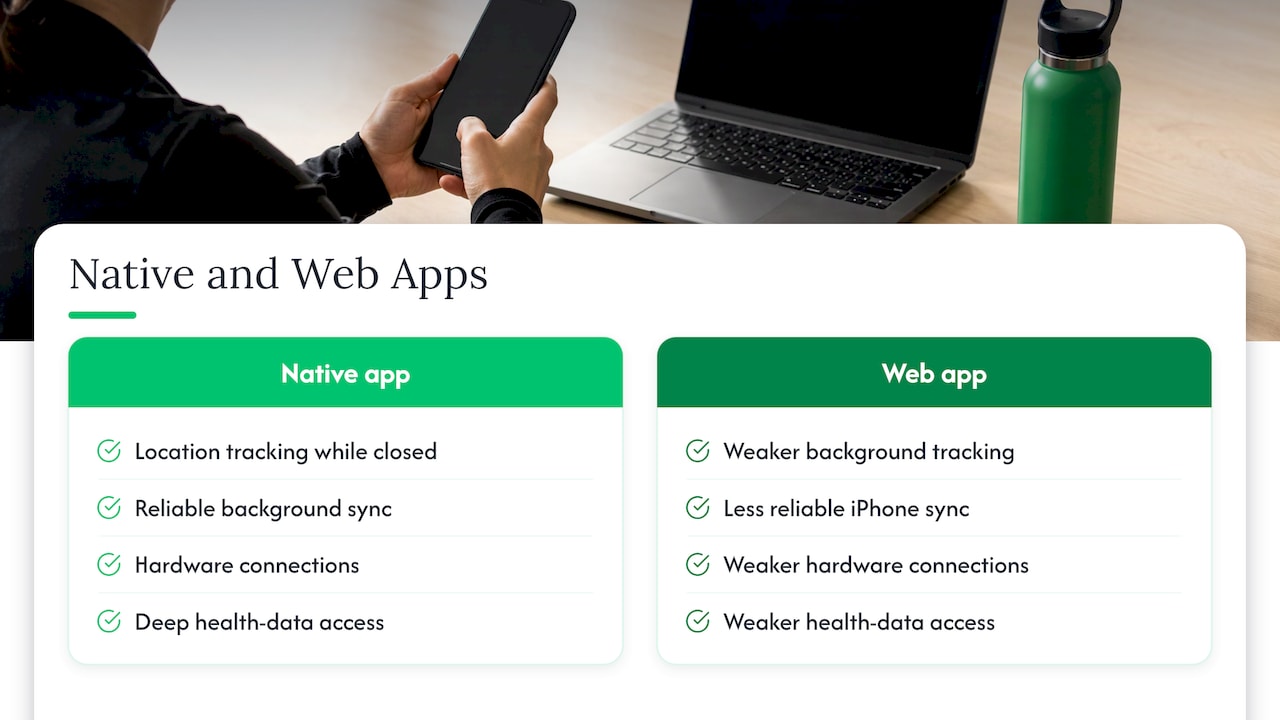
The web is weaker than native in exactly the places an activity challenge depends on. Upwwards’ 2026 comparison points to background work such as location tracking while the app is closed, reliable background sync (especially on iPhone), connections to hardware, and deep operating-system integration such as health data. It also notes that on iPhone, web push notifications only work after the user adds the web app to the home screen and grants permission.
Put that into a real scenario. A marketing team runs a four-week step challenge. Half the team has to remember to open a browser tab after each walk and type in their distance. By week two, entries get skipped, the leaderboard stops reflecting what people really did, and the people who most needed encouragement drift away. Tracking that happens automatically removes that failure point, which is why we built Charity Miles as an app that logs distance by GPS and pedometer.
Where mobile brings its own challenges
Mobile is not free of trouble. Teams that build or choose a mobile experience should expect these.
- Two platforms. iOS and Android are separate targets. ATARC’s federal Mobile Application Playbook notes that the two together made up more than 94% of the U.S. mobile market in its 2015 comScore figure, so covering both is the norm for reaching an audience.
- Device variety. Phones differ in screen size, memory, battery and operating-system version, so testing has to cover that spread.
- Network conditions. Users move between Wi-Fi, cellular and no signal, and the app has to behave sensibly in each.
- Store updates. Releases pass through app-store review, while web updates go live right away, as MobiLoud’s comparison explains.
These are engineering matters, and they sit with the team that maintains the app. For a company running a challenge, the practical question is simpler: does the participant’s phone do the tracking without effort? That is the experience a mobile-first challenge is designed to give. Charity Miles is available on both iOS and Android, so employees on either kind of phone can join the same team.
Testing: what changes between the two
Whether you are a charity commissioning an app or a company choosing a platform, it helps to know what good testing looks like. Telerik’s guide to testing mobile and web apps says the core techniques are shared: functional, security, accessibility, usability, performance and compatibility testing. The details differ.
| Area | Web app | Mobile app |
|---|---|---|
| Browsers and devices | Cross-browser checks, HTML and CSS verification | Device and OS compatibility, gesture testing |
| Connectivity | Needs an internet connection to function | Wi-Fi, cellular and offline behavior, switching between them |
| Resources | Mostly page performance | Battery use, memory, storage |
| Lifecycle | Page loads and sessions | Install, update, uninstall, foreground and background |
The same source warns that testing only one version and assuming the other works is risky, because the two do not share a codebase. CloudQA’s 2026 guide adds that mobile testing should cover foreground and background behavior, offline mode, and updates that carry data over from older versions. If you are building a fundraising or challenge app and want a sense of how a native build gets made, building native iOS and Android apps shows one approach to the process.
Privacy and permissions
People hesitate to share location, and that is reasonable. The research does not say that apps are worse or that websites are worse. In a peer-reviewed study of 50 popular services, websites leaked more types of information than apps in 40% of cases, and locations and names leaked more often from websites. Only apps leaked unique device identifiers. The authors conclude that privacy depends on the platform and the service.
For anyone joining a challenge, this means two habits. Read what each permission is for, and grant location only to the app that needs it for tracking. For a company rolling out a program, tell employees up front what is collected and why. Clear explanations lift sign-up more than any reminder does.
Accessibility and inclusion
A challenge only works if everyone can take part. On the web, that means pages that work with screen readers and keyboard navigation. On mobile, it means readable text sizes, sufficient contrast and touch targets that are easy to hit. Guidance on web accessibility and inclusion explains why accessible design widens your audience. Inclusion is also about the activity itself. Because any movement can count, whether a lunchtime walk, a bike commute or a run, a challenge is not limited to athletes.
How to choose: a short decision path
- List what participants must do. If the answer includes “log distance from a walk, run or ride”, you need a mobile app.
- List what administrators must do. Creating teams, setting rules, viewing results and exporting reports are comfortable in a browser.
- Decide how much reach you need. Mobile gives you the lock-screen reminder. The web gives you a link anyone can open on a laptop.
- Plan for both operating systems. Pick a platform that covers iOS and Android.
- Set expectations on data. Say what is tracked, and keep it to what the challenge needs.
The federal playbook reaches a similar conclusion in its own context: if resources allow, offer both a responsive website and a native app, since sites are cheaper and searchable while native apps give access to device features and push notifications. For a movement challenge, the app carries the activity and the web carries everything else.
How this plays out with Charity Miles
Charity Miles is a free mobile app for iOS and Android. Members walk, run or bike, the app tracks distance through GPS and pedometer, and money is donated to the member’s chosen charity for every mile logged. It is free for members and free for charities.
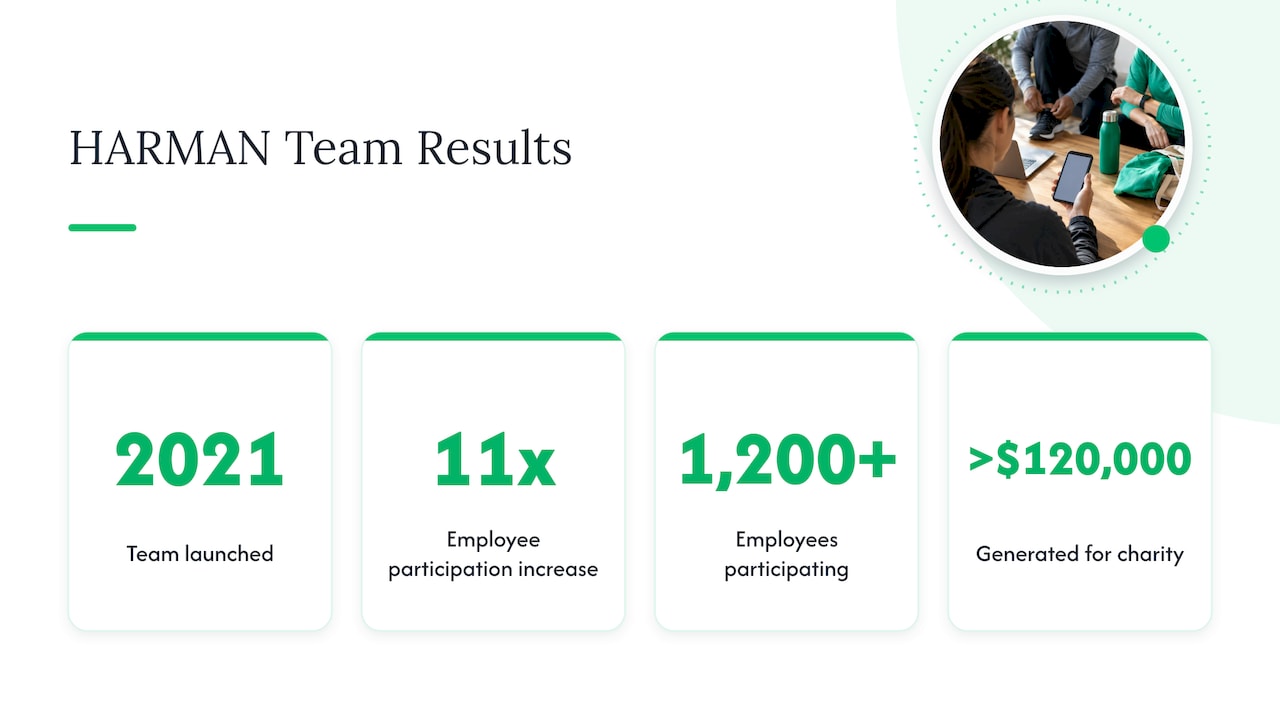
For companies, the Employee Empowerment Program builds on that. Companies create private teams for employees, run friendly intra-company challenges, and can sponsor employees’ miles on their own terms: the rate per mile, the total sponsorship cap, and whether donations go to each employee’s chosen charity or a company-selected cause. Our HARMAN team is a good example: since launching in 2021, it has seen an 11x increase in employee participation, with 1,200+ employees generating over $120,000 for charity.
Charities can use the same platform to engage grassroots supporters, and brands can sponsor or activate their communities through activity challenges. If you want to read more about how apps are changing giving, see our piece on innovative fundraising apps.
Perspective
We built Charity Miles around one belief: people give more of their time and miles when the effort is close to zero. That is the reason the app lives on the phone. The phone is already there on the walk, the run and the ride, so the miles are counted without anyone typing them in.
The web has its place, and we use it for what it does well: setting up teams, running company challenges and reporting. But for the moment of movement, the app is what makes participation feel effortless, and effortless participation is what turns a one-time event into a habit.
We also count all movement, not just athletic effort. A lunchtime walk matters as much as a long run, and that keeps a team inclusive. When a company controls its own sponsorship terms and donation allocation, every mile ties personal motivation to the company’s mission.
Gene
Start a challenge your team will keep doing
If you are an HR, CSR or wellness leader, our Employee Empowerment program lets you set up a private team, choose the rate per mile and cap, and decide where donations go. If you are an individual or a charity, you can see how the Charity Miles app works and start logging miles for a cause you care about.
FAQ
Is a mobile app or a web app better for a step or movement challenge?
A mobile app is better for the activity itself, since it can use device sensors, run in the background and send reminders. A web interface is well suited to administration and reporting. Charity Miles uses the app for tracking miles and the platform for team and sponsorship management.
Do I need to install anything to join a Charity Miles challenge?
Members track their miles with the Charity Miles app on iOS or Android, which is free to download and use. Companies set up private teams for their employees through the Employee Empowerment Program.
Can a web app be turned into a mobile app?
Often yes, but it is a project rather than a switch. A progressive web app can be installed from the browser, while a store-distributed native app is a separate build that needs testing on devices and operating systems. Features that rely on background location or hardware are where native builds do best.
Is a progressive web app a good middle path?
A PWA adds installability, offline use and push messages to a website, which suits many content and service tools. For continuous tracking of movement, Upwwards’ comparison notes web is weaker at background location work, especially on iPhone, so a native app is the stronger fit.
Sources
- What is a progressive web app? (MDN)
- Web App vs Mobile App: Which to Build First? (Upwwards)
- Mobile Application Playbook (ATARC)
- Mobile App vs Web App: What’s the Difference? (MobiLoud)
- Techniques for Testing Mobile Apps vs. Web Apps (Telerik)
- Web vs Mobile App Testing: Key Differences (CloudQA)
- Comparing the Privacy Implications of App- and Web-Based Online Services (IMC 2016)