
To start a step challenge right now: recruit 5–10 colleagues as your launch group, download Charitymiles or open your phone’s built-in step counter, and set a start date four weeks out. That’s the whole first move. Everything else, rules, prizes, leaderboards are just refinement.
The CDC recommends employers actively support workplace physical activity programs as a practical way to improve employee health and reduce absenteeism. A step challenge is one of the lowest-friction ways to do exactly that. You don’t need a budget, a vendor contract, or a wellness committee to get started today.
Your first three actions:
- Message your launch group: Text or Slack 5–10 people who are likely to say yes. A small, enthusiastic cohort creates early momentum and social proof for the broader rollout.
- Pick one tracking method: Charitymiles works on iOS and Android, counts walking, running, and biking, and converts movement into charitable donations at no cost to participants. Alternatively, your phone’s native health app works fine for a small group.
- Lock in a start date: Four weeks from today gives you enough runway to communicate, onboard, and build anticipation without losing urgency.
Key Takeaways
Starting a step challenge works best when you keep the rules simple, make progress visible from day one, and tie movement to something meaningful beyond the leaderboard.
| Point | Details |
|---|---|
| Start in one hour | Recruit a small launch group, pick one tracking method, and set a date four weeks out. |
| Keep rules to one page | Simple scoring and clear submission rules drive higher participation than complex systems. |
| Build in inclusivity | Offer percentage-improvement prizes and count all movement types, not just walking. |
| Track what matters | Capture participation rate, average daily steps, and charity impact for your post-challenge report. |
| Charitymiles adds CSR | The Employee Empowerment Program combines step tracking, team challenges, and charitable giving in one free-to-join platform. |
Table of Contents
- How to start a step challenge: your 60-minute setup checklist
- How to organize a walking challenge from planning to finish
- How do you choose the right tracking method or app?
- Why Charitymiles works well for workplace step challenges
- What does the evidence say about step challenges at work?
- Sample 4-week challenge plan and ready-to-use templates
- Launch day, monitoring, and closing the challenge
- What I’ve learned from running workplace step challenges
- Charitymiles: a ready-made step challenge with built-in CSR
- Sources
How to start a step challenge: your 60-minute setup checklist
You don’t need a full project plan. Most organizers can complete setup in about an hour if they work through these steps in order.
- Get leadership buy-in (10 min). Send a one-paragraph email to your manager or HR lead. Include the start date, the tracking method, and one benefit stat. Leadership participation doubles visible engagement.
- Choose your tracking method (5 min). Decide between a phone pedometer, a wearable sync, or a dedicated app. For groups under 20, a shared spreadsheet plus phone steps works. For larger teams, a platform with an admin dashboard saves hours.
- Set the format (5 min). Team vs. individual, 4-week duration, and one scoring rule (total steps, average daily steps, or a streak count). Pick one and commit.
- Draft your launch message (15 min). Write a short, enthusiastic email or Slack post. Include the start date, how to sign up, what counts as movement, and the prize or recognition structure.
- Create a leaderboard channel (5 min). A dedicated Slack channel, Teams channel, or shared Google Sheet keeps energy visible. Name it something fun: #StepItUp or #WalkForGood.
- Set your prize strategy (10 min). Small budget: a gift card, an extra PTO hour, or a company-branded item. Zero budget: public recognition, a trophy emoji, a shoutout from the CEO.
- Write the rules (10 min). One page. Cover what counts as movement, how to submit steps, what happens if someone misses a day, and a basic privacy note.
Pro Tip: Send the signup link in the same message as the announcement. Every extra step between “I’m interested” and “I’m in” costs you participants.
How to organize a walking challenge from planning to finish
A well-run challenge follows a clear sequence. Skipping steps early creates confusion later, so work through these in order.
Step 1: Define your goals and success metrics
Before you write a single rule, decide what success looks like. Participation rate (aim for a majority of eligible employees), average daily steps, and engagement metrics like leaderboard check-ins are the three numbers worth tracking. If you’re pitching this to leadership, frame it around employer medical and drug costs and the productivity gains from reduced absenteeism.
Step 2: Recruit team champions
Identify one enthusiastic person per department or team. Champions handle local questions, nudge participation, and post weekly updates. They’re the difference between a challenge that fades in week two and one that finishes strong.

Step 3: Set your rules
Keep the rules document to one page. Cover:
- What counts: Walking, running, biking, swimming laps, wheelchair rolling. The more inclusive the list, the higher the participation.
- How to submit: Daily auto-sync via app, or weekly self-report by Friday at 5 PM.
- Missed days: No penalty. Steps don’t carry over, but participants aren’t disqualified for gaps.
- Scoring method: Choose one. Individual total steps rewards high performers. Team average per active day levels the field. A “most improved” category rewards progress over raw output.
- Privacy: Steps are visible to the team leaderboard. No health data beyond step count is shared or stored by the organizer.
Step 4: Choose your format and scoring
Team challenges tend to generate more sustained engagement than individual competitions because they create accountability without direct comparison. Small teams of a few people work well: they are personal yet can accommodate occasional absences.
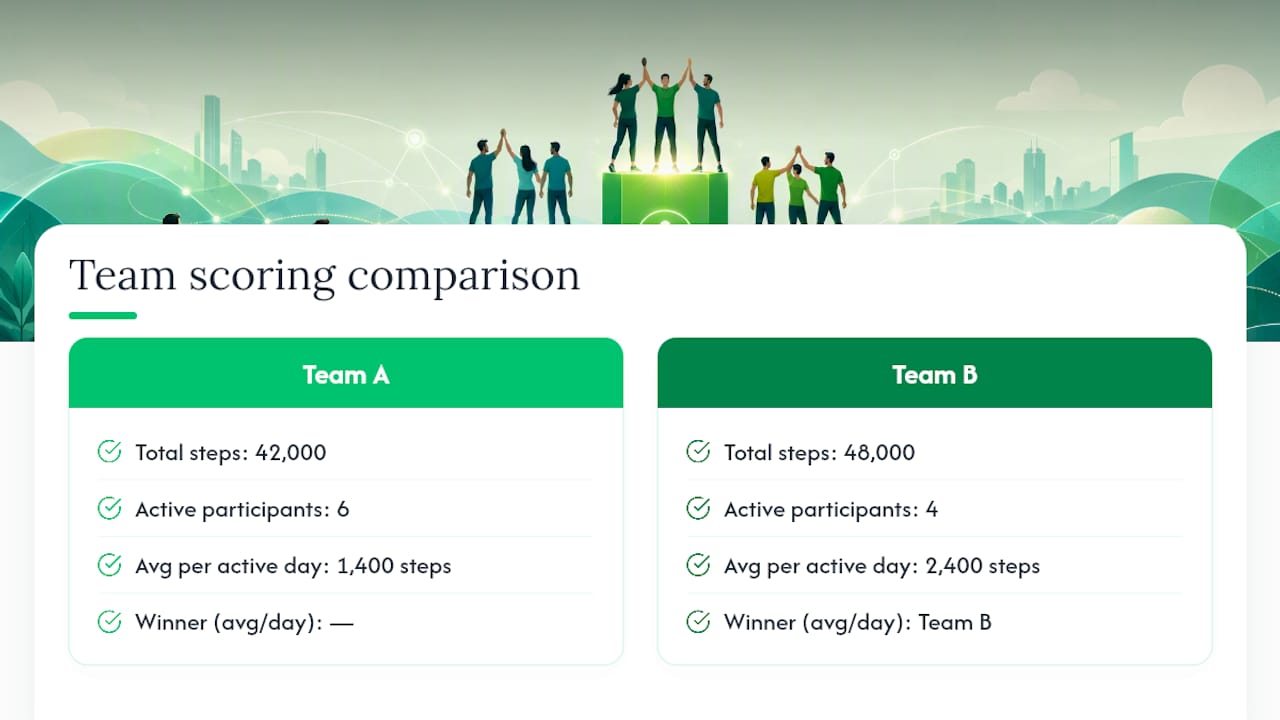
Scoring example: Team A logs 42,000 steps across 6 members over 5 active days each. Their average per active day is 1,400 steps per person. Team B logs 48,000 total but only 4 members participated actively, giving them 2,400 per person per day. Under an “average per active day” rule, Team B wins despite fewer total steps. Decide in advance which metric you’re using and publish it before day one.
Step 5: Build in accessibility from the start
The Mayo Clinic notes that 10,000 steps is a useful target but not universally appropriate, especially for sedentary beginners. A percentage-improvement prize (most improved from personal baseline) keeps the challenge motivating for people who start at 2,000 steps a day, not just those already hitting 8,000.

Pro Tip: Offer at least one non-step category, like “most active days” or “most consistent week,” so participants who can’t walk long distances still have a path to recognition.
How do you choose the right tracking method or app?
The tracking method shapes everything: onboarding friction, data accuracy, and how much admin time you spend each week. Here’s how the main categories compare.
Phone pedometer (built-in health app): Works on any smartphone. Zero cost, zero setup. Accuracy varies by phone model and pocket position. Best for small groups (under 15) comfortable with manual reporting.
Wearable sync (Fitbit, Apple Watch, Garmin): Higher accuracy, especially for non-walking movement. Requires participants to own a device and connect it to a platform. Creates equity issues if some employees don’t have wearables.
Dedicated challenge app: Handles syncing, leaderboards, and reporting automatically. The best options integrate with both phone pedometers and wearables, so participants aren’t penalized for their device choice.
Feature checklist for a workplace challenge platform:
- Wearable and phone integration (both, not one or the other)
- Private team creation and leaderboard controls
- Admin reporting dashboard with exportable data
- Privacy controls: participants see only what you configure
- Configurable cost or sponsorship options
- Simple signup: one link, no IT involvement required
Decision rule by group size:
- Under 20 people: Phone steps plus a shared Google Sheet or simple app. Low overhead, easy to manage.
- 20–100 people: A dedicated app with team features and a basic leaderboard. Look for one-click signup.
- 100+ people: An employee program platform with an admin dashboard, wearable integration, and reporting. Manual tracking at this scale creates errors and drops participation.
Understanding why tracking progress matters goes beyond step counts. Visible progress data keeps participants motivated and gives organizers the evidence they need to run the challenge again next quarter.
Why Charitymiles works well for workplace step challenges
Charitymiles combines a step challenge with a CSR program, which changes the motivation dynamic. Participants aren’t just competing for a prize; they’re generating real charitable donations with every mile they log.
The Charitymiles Employee Empowerment Program is used by hundreds of global companies. That’s a participation and fundraising result most standalone step challenges don’t approach.
How Charitymiles maps to the feature checklist:
- Integration: Syncs with phone pedometers and GPS tracking for walking, running, and biking.
- Team features: Private company teams, friendly intra-company challenges, and configurable leaderboards.
- Reporting: Admin dashboard with participation and impact data.
- Privacy: Companies control what data is visible; individual health data stays private.
- Cost and sponsorship: Free for participants. Companies choose their own sponsorship rate per mile and total cap, or run the program without a financial sponsorship.
- Signup: One app download, available on iOS and Android, no IT configuration required.
The program has been running since 2012 and has generated tens of millions of dollars for charity. Any movement counts, including walking, running, and biking, which makes it genuinely inclusive across fitness levels.
HARMAN’s result: 11x increase in employee participation and over $120,000 raised for charity since 2021.
What does the evidence say about step challenges at work?
The business case for a workplace step challenge is stronger than most organizers realize, and the evidence is specific enough to use in a leadership pitch.
A pooled analysis published in peer-reviewed research found that higher daily step counts are associated with lower mortality and better health outcomes, with effect sizes varying by age and baseline activity level. The relationship isn’t perfectly linear, but the direction is consistent: more movement correlates with better health markers across populations.
Employer medical and drug costs represent a significant line item for most mid-size and enterprise companies. Wellness programs that demonstrably reduce absenteeism and improve energy levels have a credible path to ROI, even before accounting for engagement and retention effects.
The CDC’s employer guidance recommends specific actions companies can take: providing time for physical activity during the workday, creating supportive environments, and offering programs that make movement easy and visible. A step challenge addresses all three.
KPIs worth tracking for your post-challenge report:
- Participation rate (enrolled vs. eligible employees)
- Average daily steps across the challenge period
- Week-over-week step improvement
- Retention and absenteeism data (if HR can share it)
- Charity impact, if using a CSR-linked platform like Charitymiles
One-paragraph leadership pitch: “A four-week step challenge costs us minimal time to run and zero budget if we use a free app. The CDC recommends exactly this kind of employer-supported activity program. Research links higher daily step counts to lower mortality and better health outcomes. If we use Charitymiles, we also generate charitable donations for causes our employees care about, which directly supports our CSR goals. I’d like to launch this next month with a small pilot group and report back on participation.”
Sample 4-week challenge plan and ready-to-use templates
4-week timeline
Rules template
[Company Name] Step Challenge Rules
- Duration: 4 weeks, [Start Date] to [End Date]
- Who can join: All employees
- What counts: Walking, running, biking, wheelchair rolling, swimming laps
- Tracking: Charitymiles app (iOS/Android) or phone health app; weekly self-report accepted
- Scoring: [Choose one: individual total steps / team average per active day / most improved from baseline]
- Missed days: No penalty; participants remain eligible
- Privacy: Step totals visible on team leaderboard; no other health data shared
- Prizes: [List prizes or recognition here]
Launch email template
Subject: We’re starting a step challenge, and you’re invited
Hi team,
Starting [Date], we’re running a 4-week step challenge. Walk, run, or bike your way to the top of the leaderboard, and if we use Charitymiles, every mile you log also generates a donation to a charity of your choice.
How to join: Download Charitymiles (free, iOS and Android) and join our team: [Team Link]
What counts: Any movement. Lunchtime walks, bike commutes, morning runs.
Prizes:
Questions? Message [Organizer Name]. Let’s move.
Launch day, monitoring, and closing the challenge
Launch day checklist
- Send the kickoff message by 9 AM
- Confirm the leaderboard is live and visible to all participants
- Test the signup link from a personal device
- Post a photo or short video of leadership taking their first steps
- Confirm team champions are ready to answer questions locally
Monitoring cadence
Check the leaderboard daily for the first week. After that, weekly summaries posted on Monday mornings keep energy up without creating admin fatigue. Watch for:
- Sync issues: If a participant’s steps aren’t updating, ask them to manually sync their device or re-log into the app. Most sync problems resolve with a simple logout and login.
- Motivation drops in week 2: This is the most common drop-off point. A surprise mini-prize or a “most improved this week” shoutout usually reverses the trend.
- Missing data: If a participant forgets to log for several days, allow a one-time manual entry for the missed period. Document the policy in your rules so it’s consistent.
Reporting fields to capture
- Total participants enrolled vs. eligible employees (participation rate)
- Average daily steps across the full challenge period
- Top three teams or individuals
- Total charity impact (if using Charitymiles)
- Week-over-week step improvement percentage
Closing celebration ideas
- A live leaderboard reveal in a team meeting or all-hands
- A short video or slide deck showing total steps logged and charity dollars raised
- Public recognition from a senior leader
- A “next challenge” teaser to maintain momentum
Tracking achievement milestones through the closing celebration gives participants a sense of completion and makes them more likely to join the next round.
What I’ve learned from running workplace step challenges
The single biggest mistake organizers make is writing rules that are too complicated. If a participant has to read more than one page to understand how scoring works, you’ve already lost a portion of your audience. Simple rules, posted once, enforced consistently, outperform elaborate systems every time.
Three things that work reliably: a leadership kickoff walk on day one (it signals that this matters), team coaches who send one encouraging message per week (not daily, just weekly), and a surprise mini-prize in week two when motivation typically dips. None of these cost much. All of them move the needle.
Two traps to avoid: poor onboarding and invisible progress. If the signup process takes more than three minutes, you’ll lose people before they start. And if participants can’t see the leaderboard easily, the competitive energy that drives engagement disappears. Make the leaderboard the first thing people see when they open the app or channel.
After the challenge ends, don’t let the momentum die. A monthly “movement check-in” post, a lightweight ongoing leaderboard, or a second challenge six weeks later keeps the habit alive. The goal isn’t a four-week event. It’s a culture shift toward movement as a normal part of the workday.
Charitymiles: a ready-made step challenge with built-in CSR
Most step challenge platforms stop at steps. Charitymiles goes further: every mile your employees log generates a charitable donation to a cause they personally choose, turning a wellness program into a visible CSR initiative at the same time.
The Charitymiles Employee Empowerment Program covers every dimension on the selection checklist: wearable and phone integration, private team creation, an admin reporting dashboard, configurable sponsorship terms, and a one-link signup that requires no IT involvement. For HR and wellness leaders who want a corporate step challenge that combines employee wellbeing, team engagement, and measurable CSR impact in one platform. Charitymiles is the practical next step. Visit charitymiles.org/employee-empowerment-for-corporations to see how the program works and get your team started.
Sources
- National Center for Biotechnology Information — step count and health outcomes (PMC5997342)
- Statista — Company medical and drug costs in the U.S.