
Fitness apps are good at counting steps, decent at estimating distance, and poor at telling you exactly how many calories you burned. In controlled tests, smartphone step counts landed within roughly 7% of a human observer’s count. Calorie estimates can miss by a third or more. If you use your numbers to spot trends and keep a habit going, they are accurate enough. If you treat them as lab measurements, they are not.
Below we walk through what the research says for steps, distance and calories, what throws the numbers off, and how to get cleaner data from the phone already in your pocket.
TL;DR
- Step counts are the most reliable output. Smartphone apps differed from direct observation by between −6.7% and 6.2% in a treadmill study.
- Distance is shakier. In one set of iPhone experiments, step counts were within about 2% while distance estimates deviated by 30-40%, depending on walking speed and style.
- Calories are the weakest number. Across wearables, errors ranged from −21.27% to 14.76%, and a Stanford study found none of the seven devices tested produced acceptable energy expenditure data.
- Most error comes from how you carry the phone, not from the app. Keep it in a pocket and carry it as often as you can.
- Use the numbers for trends and goals, not for precise calorie math.
Table of Contents
- How accurate are fitness apps overall?
- Step counter accuracy: what studies found
- Activity tracking accuracy: distance and heart rate
- Why calorie counts are the least reliable number
- What makes tracking less accurate
- How to get more accurate numbers from your app
- How to interpret your activity and calorie estimates
- Our perspective: accuracy matters, but consistency matters more
- Turn your tracked miles into something that lasts
- FAQ
- Sources
How accurate are fitness apps overall?
It depends on what you ask them to measure. A fitness app is only as good as the sensor and the algorithm behind each number. Steps come from the phone’s accelerometer, which detects the rhythm of walking. Distance is usually steps multiplied by an estimated stride length, or GPS when you are outdoors. Calories are a model: the app takes your weight, age, sex, pace and duration and applies a formula. That last step is a guess about your body, not a measurement of it.
A useful way to think about it:
| What the app reports | How it is produced | How much to trust it |
|---|---|---|
| Steps | Accelerometer detecting footfalls | High, if you carry the phone |
| Distance (outdoors) | GPS, sometimes blended with steps | Good in open areas, weaker near tall buildings or tree cover |
| Distance (indoors) | Steps times estimated stride | Moderate, varies with pace |
| Heart rate (wrist wearable) | Optical sensor | Good for steady activity |
| Calories burned | Formula using your profile | Low, use as a rough guide |
The research behind that table is below.
Step counter accuracy: what studies found
Step counting is the strongest case for fitness apps. In a JAMA study on smartphone applications and wearable devices, the mean step-count differences for smartphone apps ranged from −6.7% to 6.2% compared with direct observation on a treadmill. That is close enough that a 10,000-step day on your app is very likely somewhere between 9,300 and 10,600 actual steps under similar conditions.
Lab results are the best case, though. A 2020 systematic review of commercial wearables found that step counts were generally more accurate in laboratory settings than in free-living ones, and that accuracy varies by study setting, brand and device. Real life adds pockets, bags, strollers, stairs and stop-and-go walking.
Free-living studies show the spread:
- iPhone in daily life. A 2019 validation study found the iPhone Health app underestimated steps by 12% in free-living conditions compared with a validated pedometer, largely because people were not carrying the phone all day.
- Android apps while walking at a normal pace. A 2025 study of three Android step counters found systematic overestimation, with error rates from 6.62% to 9.24%.
- Wrist-worn trackers. In structured free-living conditions, wrist-worn trackers had step-count error under 5%.
- Wearables as a group. A 2024 review reported mean absolute percentage errors from −9% to 12%, with frequent underestimation.
The pattern is consistent. Apps and trackers can be off in either direction, usually by single digits to low double digits. They are consistent enough with themselves that your own week-to-week changes mean something.
Activity tracking accuracy: distance and heart rate
Distance is where a good step count can turn into a misleading number. In experiments on iPhone Health data, step counts were accurate within an average error of 2%, but distance estimates could deviate by 30-40% depending on walking speed and style. The reason is stride length. If the app assumes a stride that does not match yours, every step adds a small error, and the errors stack up over a long walk.
GPS helps outdoors, which is why apps that use it for walks, runs and rides tend to give better distance than a pure pedometer. Dense city blocks and heavy tree cover can still bend a route, so a mile on your screen may be a little short or long. Treat a small gap between two apps as normal.
For gait detail, the picture is mixed. A 2023 study of the Apple Health app confirmed it is valid for measuring gait speed and step length in adults and seniors, but found poor-to-moderate validity for double support time.
Heart rate on a wrist wearable is more dependable than calories. Stanford researchers testing seven wearables against clinical standards found heart rate error was acceptable for walking, running and cycling, with the Apple Watch showing the lowest error at 2.0%. The same study found that none of the devices could produce energy expenditure data with acceptable error.

Why calorie counts are the least reliable number
The Stanford finding is worth sitting with: heart rate was close, but calories derived from it were not. Calorie burn depends on your metabolism, body composition, fitness level and the exact intensity of the effort, and a consumer device sees only a slice of that.
A 2024 umbrella review pooled the evidence. Wearables mostly underestimated energy expenditure, with a mean bias of −3 kcal per minute (−3%), but individual errors ranged from −21.27% to 14.76%. The same review found wearables often overestimate aerobic capacity (VO2max) by about 15.24% in resting tests and 9.83% in exercise tests.
A smaller average bias can hide large individual misses. Errors in both directions cancel out in an average, so your own result may be well above or below it.
That is why a few questions people ask have no clean answer:
- Does 6,000 steps burn 300 calories? It might, or it might not. The figure depends on your body weight, pace, stride and terrain, and the estimate your app produces rests on a formula, not a measurement. Two people with the same step count can burn quite different amounts.
- Is 500 calories in an hour good? Whether it is good depends on your goals and your size. The more useful question is whether the effort felt moderate or hard, and whether you can repeat it next week.
- Are my “move” calories a good target? Pick a number, hold it for a few weeks, and see how it changes. The target is a personal benchmark, not a universal standard.
What makes tracking less accurate
The 2024 review lists the main culprits: algorithm differences, user-specific traits, device placement and wear time, and environmental conditions such as temperature and humidity. In practice, these are the ones you can actually see in daily life.
You are not carrying the phone
This is the biggest one for phone-based counting. The 2019 iPhone study found that people who seldom carried their phone had the largest step underestimations. The researchers described non-carrying time as a major source of bias in free-living studies, and advised caution when interpreting smartphone step data. If you leave the phone on a desk while you walk to a meeting, those steps never happen as far as the app is concerned.
Where you carry it
The same study associated carrying a phone in a pocket, rather than a bag, with less underestimation. A bag swings and shifts independently of your body, so the motion signal gets muddied.
Your stride and pace
Distance estimates depend on assumed stride length. Slow strolling, brisk walking and jogging all change it, which is why distance from steps alone can drift by a large margin.
The app’s profile data
If your weight, height or age is out of date, calorie estimates inherit the error. It is a quick fix, and it is the one most people skip.
Different apps, different algorithms
Two apps on the same phone can report different totals for the same walk. Neither is necessarily wrong. They filter motion differently.
How to get more accurate numbers from your app
You cannot turn a consumer app into a lab instrument, but you can remove the avoidable errors.
- Carry the phone as much as possible. The iPhone research found that carrying it more often reduces underestimation.
- Use a pocket, not a bag. Researchers also found a pocket was associated with less underestimation. For gait measures specifically, they recommend keeping the device close to your center of mass so it moves less on its own.
- Keep your profile current. Update weight and height when they change.
- Use GPS for outdoor distance. Let the app lock a signal before you start, and keep location permissions on.
- Calibrate against a known distance. Walk a measured route, such as a standard 400-meter track lap, and compare. If your app is consistently 8% high, you know how to read it.
- Stick with one app or device. A consistent tool, even a slightly biased one, gives you a trustworthy trend. Switching tools resets your baseline.
- Look at weekly averages. One day’s number is noisy. Seven days is much more useful.
If you have a medical condition, are recovering from an injury, or are working with a clinician on a heart-rate or activity target, ask your doctor or physical therapist how to use the numbers. The researchers behind the 2019 iPhone study advised clinicians to interpret smartphone step data with caution, and that applies to patients too.
How to interpret your activity and calorie estimates
A practical rule: trust direction over precision.
- Steps: a reliable signal. A jump from 5,000 to 8,000 daily steps over a month is real, even if each day is off by a few percent.
- Distance: good enough to compare one week with another when you use the same route type and the same app.
- Calories: read as a range, not a figure. If the app says 400, think of it as somewhere between roughly 300 and 500. Do not eat back every calorie it reports.
- Trends: the most valuable thing a fitness app provides. Streaks, weekly totals and personal bests keep you moving, and that is the real outcome that matters for health.
There is also a research reality behind all this. The 2024 umbrella review of 249 validation studies found that only about 11% of commercially available wearables have been validated for at least one biometric outcome, and that covers only 3.5% of the evaluations needed for a full assessment. Devices also get updated faster than studies can keep up. Healthy skepticism is the right default, and so is a willingness to keep moving anyway.
Our perspective: accuracy matters, but consistency matters more
We build an app that counts walking, running and biking miles, so we think about this a lot. Charity Miles tracks distance with GPS and a pedometer, and sponsors and companies fund donations based on those miles. That makes honest, consistent tracking important to us.
Here is where we land after working with teams of all fitness levels. First, no consumer app is perfect, and pretending otherwise does not help anyone. Second, the error rarely changes the story. When a team goes from a handful of participants to hundreds logging miles, a few percent of noise on each person’s distance is dwarfed by the real shift in behavior. Third, the people who get the most out of tracking are the ones who use it as feedback, not a verdict. A walker who sees that a lunchtime loop adds up to two miles a week is far more likely to keep going than one who obsesses over whether it was 1.9 or 2.1.
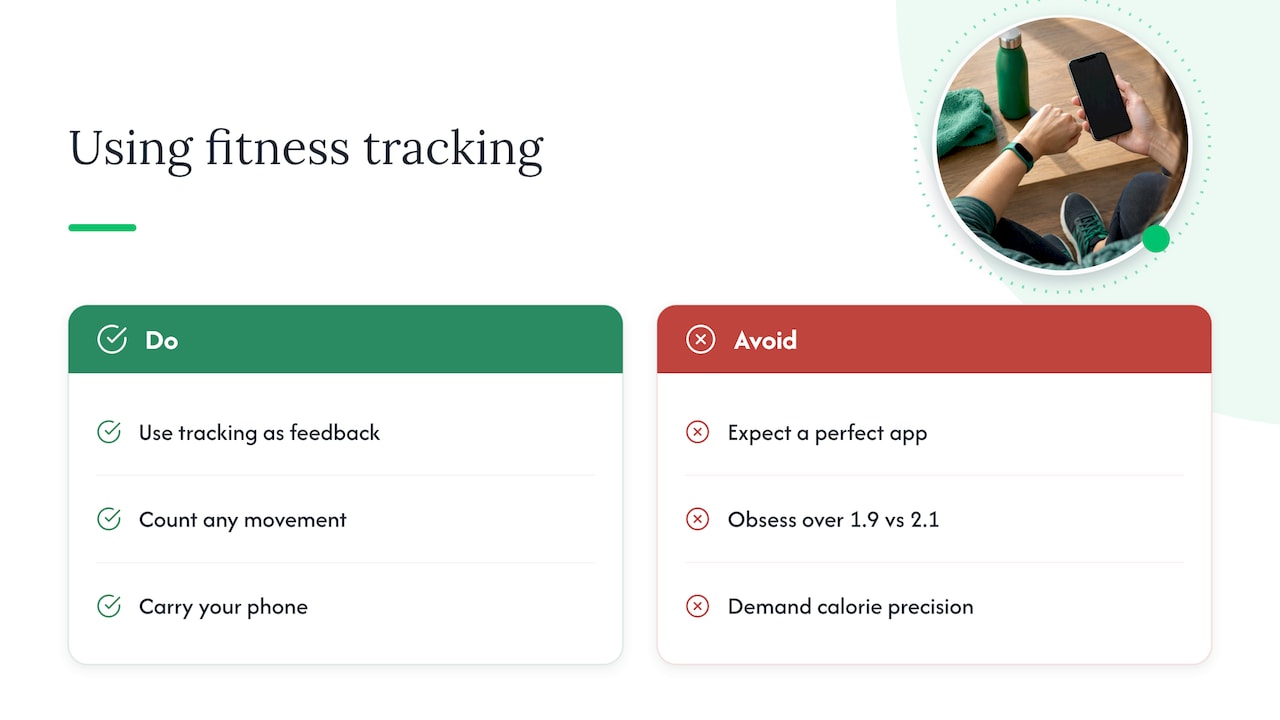
That is why we count any movement, not just athletic workouts, and why we encourage you to carry your phone and let the numbers show your trend. A lunchtime walk, a bike commute or a weekend run all count, and they all add up over time.
If your goal is to know how many calories you burned to the decimal, a fitness app is the wrong tool. If your goal is to move more, stay consistent and see it add up, it is a very good one.
— Gene
Turn your tracked miles into something that lasts
Accuracy questions fade when the number has a purpose. With the Charity Miles app, you walk, run or bike, the app tracks your distance, and money goes to a charity you choose for every mile you log. It is free for members and free for charities. You can download the app for iOS or Android and start with your next walk.
For HR, wellness and CSR leaders, the Employee Empowerment Program takes the same idea to the workplace. Companies create private teams, run friendly challenges, and can choose to sponsor employee miles by setting the rate per mile, the total cap and whether donations go to each employee’s chosen charity or a company-selected cause. Because the program is built on trends and participation, a small error in any one person’s distance does not get in the way. If you are planning a challenge, our guide to virtual walking challenges and our post on walking challenge themes are a good place to start.
FAQ
How accurate is the Fitness app on an iPhone?
For steps, fairly accurate when you carry the phone. A 2019 study found the iPhone Health app underestimated steps by 12% in everyday life, mostly because of time the phone was not on the person. Distance can be off by more, and calorie figures are estimates. Treat it as a good trend tracker.
How accurate is a step counter compared with a wearable?
Both are close for steps in good conditions. Phone apps differed from direct observation by between −6.7% and 6.2% in a treadmill study, while wearables showed mean absolute percentage errors from −9% to 12% across a 2024 review. The better choice is the one you will actually carry or wear all day.
Why does my app’s calorie count seem wrong?
Because calories are modeled, not measured. The app applies a formula to your profile, pace and time. Studies of wearables found energy expenditure errors ranging from −21.27% to 14.76%, and the Stanford study found none of the seven devices tested reached acceptable accuracy. Use calories as a rough range.
Does activity tracking accuracy matter for charity fitness apps?
A little, but consistency matters more. Small errors in individual distance spread out across many people and many days, while the habit of moving regularly is what drives real impact. Carrying your phone and keeping GPS on gets you the cleanest miles.
Sources
- Accuracy of Smartphone Applications and Wearable Devices (JAMA)
- How Well iPhones Measure Steps in Free-Living Conditions
- Validity and reliability of the Apple Health app on iPhone
- Keeping Pace with Wearables: A Living Umbrella Review
- Reliability and Validity of Commercially Available Wearable Devices
- Are Wrist-Worn Activity Trackers and Mobile Applications Valid for Step Counting?
- Comparative validity assessment of three Android step counter apps
- The iPhone Health App from a forensic perspective
- Current wearable devices provide relatively accurate measurements on heart rate but not energy expenditure